Digital Product Passport
Designing a Circular Fashion Workflow for Textile Repair & Resale
Role
UX Designer
Platform
Web Application
Tools
Figma, Figjam
Timeline
8 months
Overview
The Digital Product Passport (DPP) project was aimed at enabling transparency, traceability, and sustainabilit yacross the textile supply chain. In response to EU regulations and evolving consumer expectations, this initiative allows garments to be tagged with a QR code or NFC chip, providing access to a product’s verified history and impact.
Problem
The fashion industry generates massive textile waste, with millions of garments discarded annually instead of being repaired or resold. Processing facilities tasked with sorting, inspecting, and repairing returned garments relied heavily on manual paper-based workflows that were error-prone, time-consuming, and lacked traceability.
Key Challenges
- No standardized digital system for identifying and cataloging returned garments
- Flaw documentation was inconsistent — inspectors used free-text descriptions with no visual reference
- Product information (style numbers, PO numbers) had to be manually looked up from care labels
- No digital traceability from intake through repair, washing, and final shipment
- Packaging and shipment records were disconnected from product history
Research & Discovery
The research phase involved understanding the end-to-end workflow at textile processing facilities and identifying pain points through stakeholder interviews, facility visits, and process mapping using FigJam (Trace4Value board).
Research Methods
- Stakeholder interviews with facility managers and repair technicians
- Workflow observation at processing facilities
- Process mapping and flow diagramming in FigJam
- Competitive analysis of existing textile management tools
- Analysis of PLM (Product Lifecycle Management) data integration requirements
Key Insights from Research
Through the Trace4Value research board, several critical user needs emerged that shaped the design direction:
| Research Area | Key Finding |
| Product Identification | Workers needed a fast way to link physical garments to digital records using style/PO numbers from care labels |
| Flaw Detection | Visual, body-mapped flaw identification was far more effective than text-only descriptions |
| Digital Tagging | NFC tags provided seamless digital-to-physical linking but required intuitive scan/write UX |
| Process Tracking | Multi-step process visibility (ID → Wash → Repair → Ship) was essential for facility managers |
| Packaging & Shipment | Batch/lot-based shipping with full traceability was critical for brand partners |
Design Process
The design process followed a structured approach, starting with process mapping in FigJam and progressing through wireframing to high-fidelity UI design in Figma. The focus was on creating an intuitive, step-by-step workflow that minimized cognitive load for facility workers.
Design Principles
Guided Flow Multi-step wizards with clear progress indicators to reduce errors | Visual First Body-mapped flaw detection over text descriptions for accuracy | Smart Defaults Auto-populate from PLM when style/PO numbers are recognized | Minimal Input Selection-based UI (chips, toggles) over free-text wherever possible |
Information Architecture
The application was structured around the core processing facility workflow, organized into distinct modules accessible from a left navigation panel:
- Product Identification & Labeling — Entry point for all returned garments
- Washing Module — Track wash status and requirements
- Repair Assessment — Nature of repair documentation
- NFC Digital Tagging — Record information to digital tags
- Packaging & Shipment — Lot creation and delivery management
- Costing — Track costs associated with processing
Key Design Solutions
Product Identification & Labeling
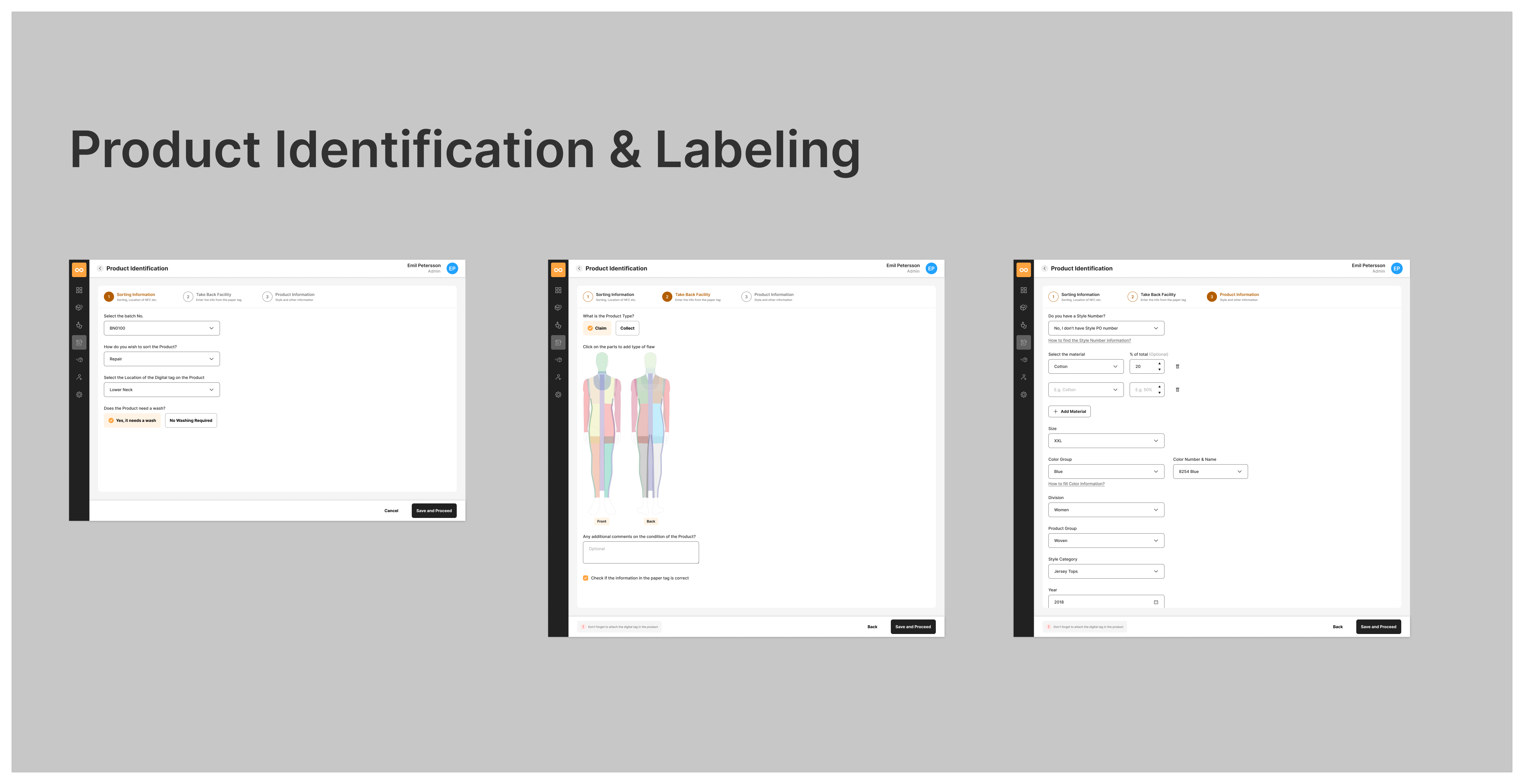
The product identification flow uses a 3-step stepper (Sorting Information → Take Back Facility → Product Information) that guides workers through the intake process. The system supports both claimed and collected product types, with automatic PLM integration when valid style or PO numbers are entered.
Design Decisions
- Interactive mannequin view (Front/Back) allows workers to click on specific body zones to log flaws with precision
- Dropdown popovers for flaw type selection (e.g., “Hole in the fabric”, “Unravelled top stitch”) reduce free-text input
- Helper guides embedded contextually (“How to find the Year/Season?”) with visual references to care labels
- Error handling for invalid style numbers with option to enter information manually
Garment Details & Process Tracking
Once a product is identified, a comprehensive detail view presents all product information alongside a vertical process timeline showing the garment’s journey through the facility. This single-screen overview was designed to give facility managers and workers instant context.
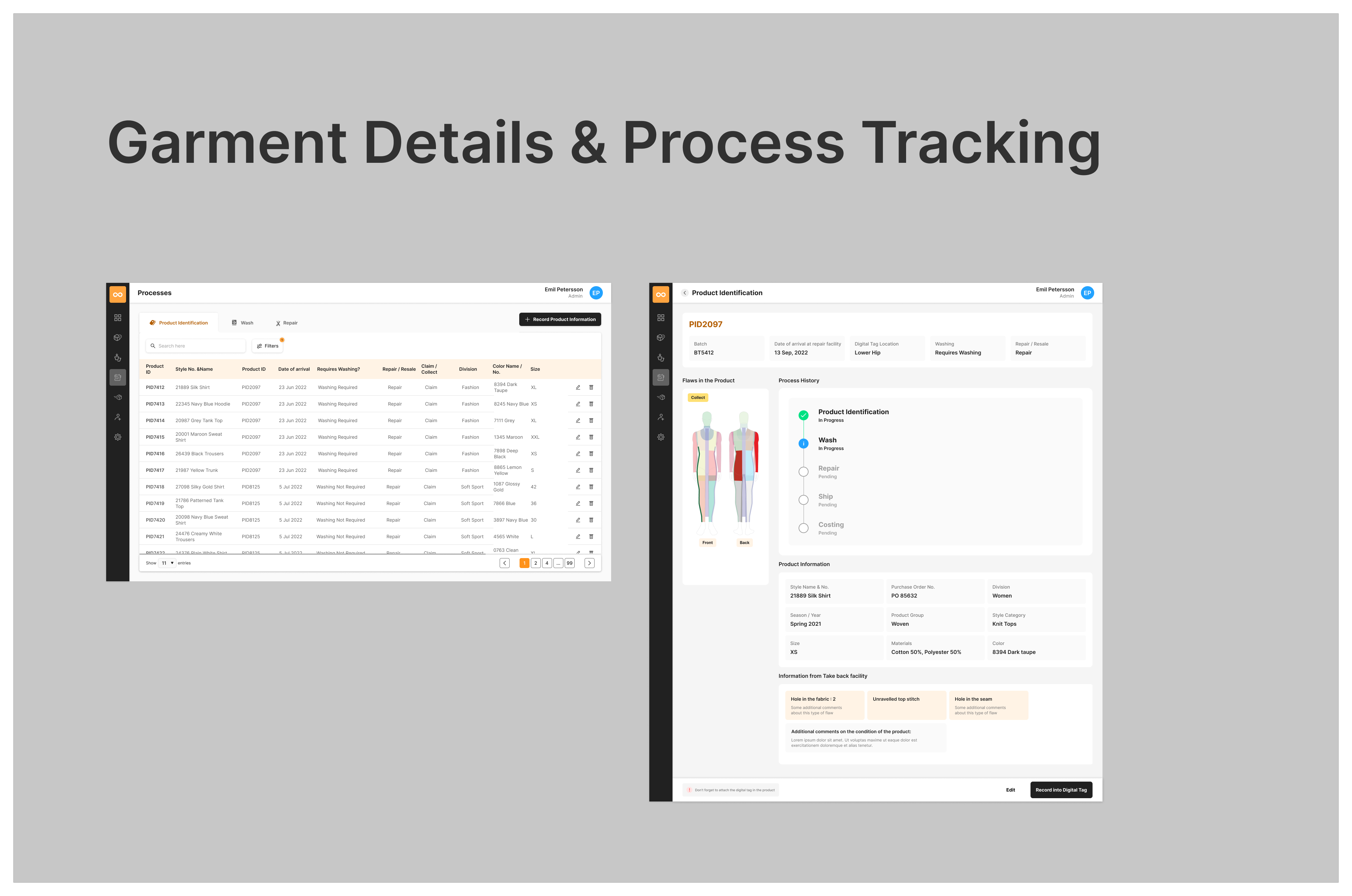
The detail view consolidates product metadata (style name, PO number, season, materials, color), flaw reports from the take-back facility, process status tracking, and a visual mannequin showing logged flaws — all in a scannable layout that eliminates the need to switch between screens.
NFC Digital Tag Integration
A critical innovation in the workflow was the integration of NFC digital tags. After processing, product information is recorded onto a physical NFC tag attached to the garment, enabling downstream traceability. The scanning modal provides clear visual feedback with an animated loading state and a cancel option.
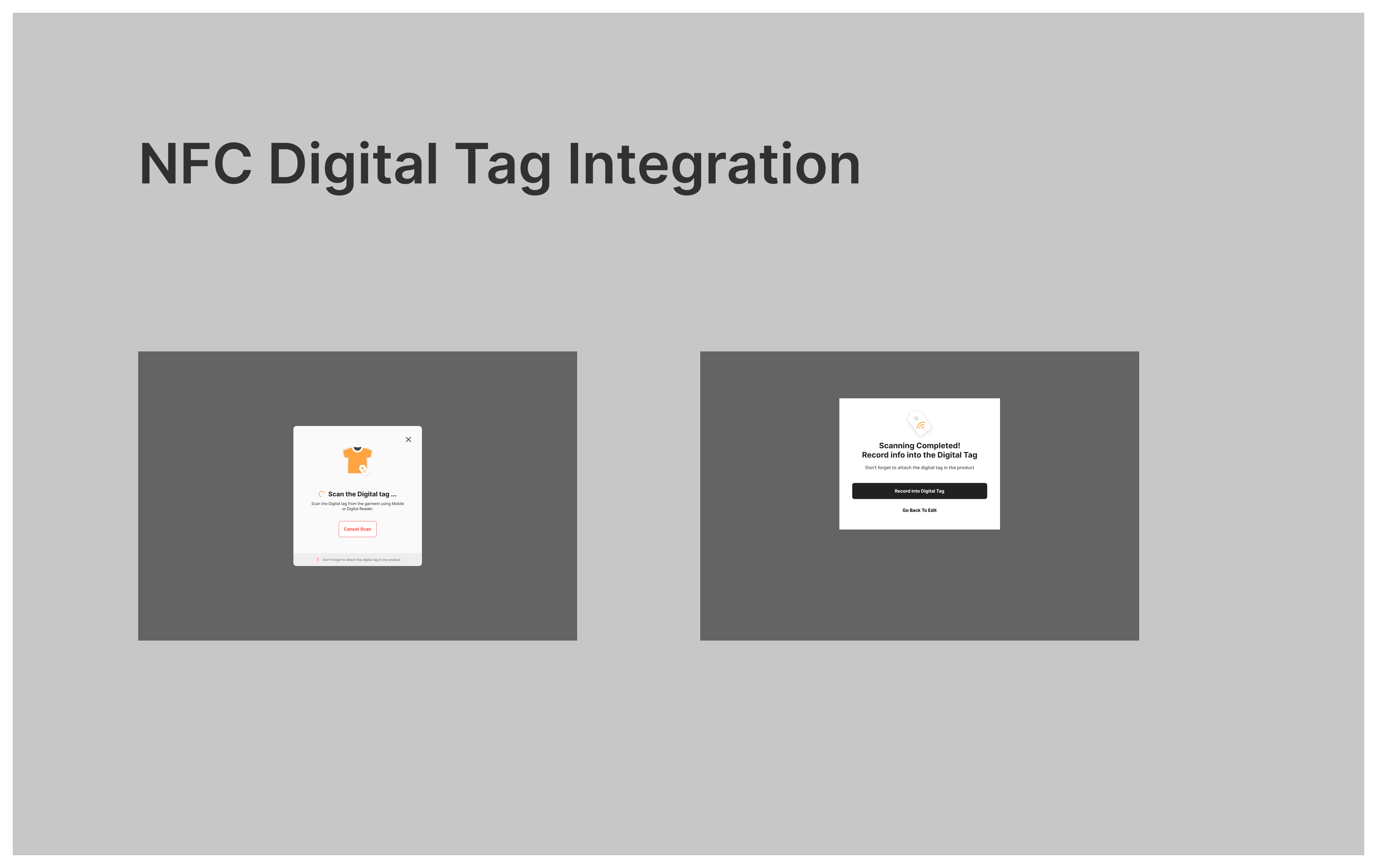
The persistent reminder bar (“Don’t forget to attach the digital tag in the product”) was added after user testing revealed that workers occasionally skipped the physical tag attachment step.
Packaging & Shipment Management
The packaging and shipment module allows facility managers to create lots, assign products to batches, and track delivery status. The data table design follows established patterns with search, filters, pagination, and inline actions (edit, delete) for efficient lot management.
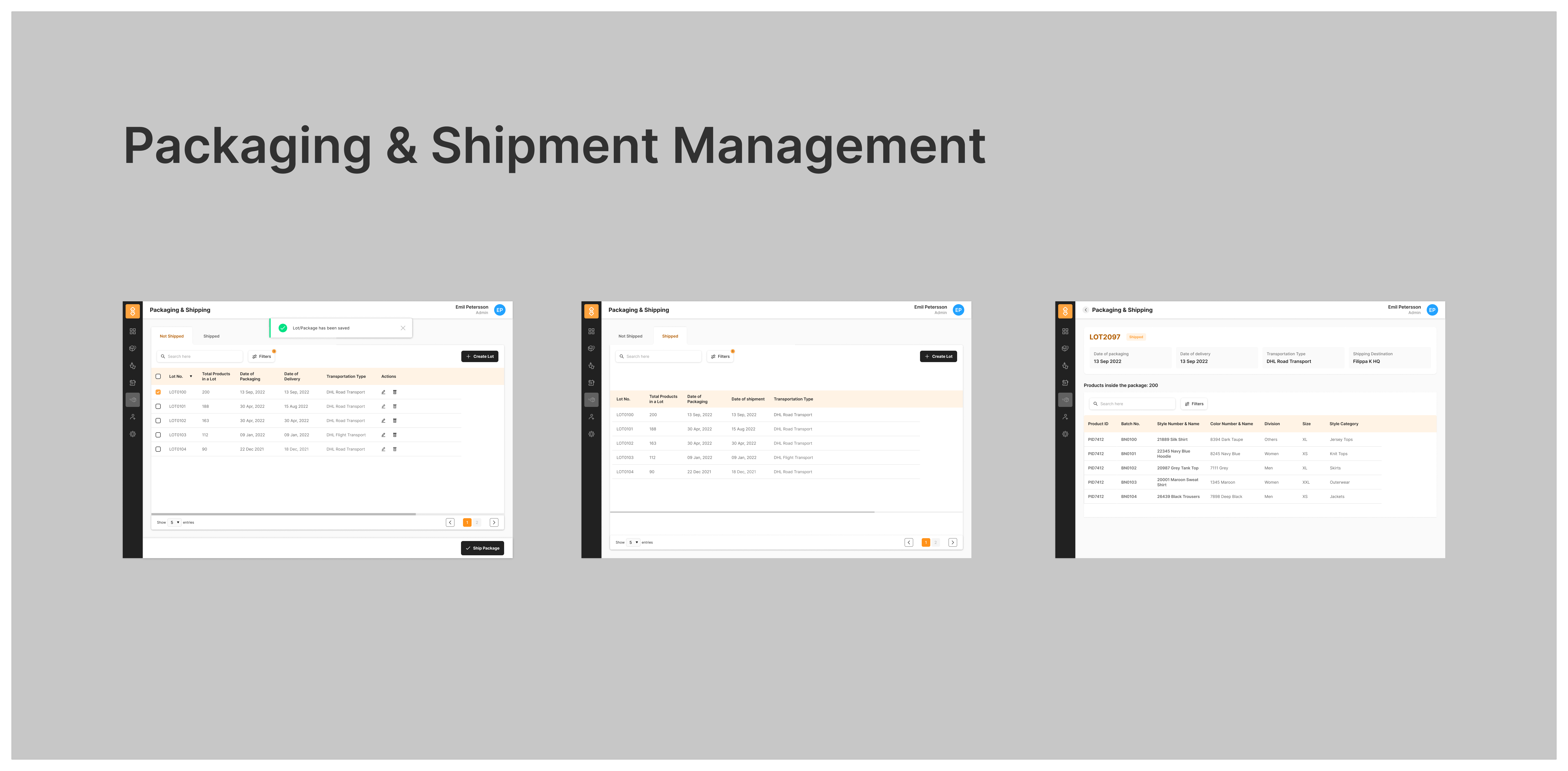
Each lot contains key information including shipment status, total products count, packaging and delivery dates, and transportation type (e.g., DHL Road Transport). This consolidated view enables quick decision-making for logistics coordinators.
Design System & Components
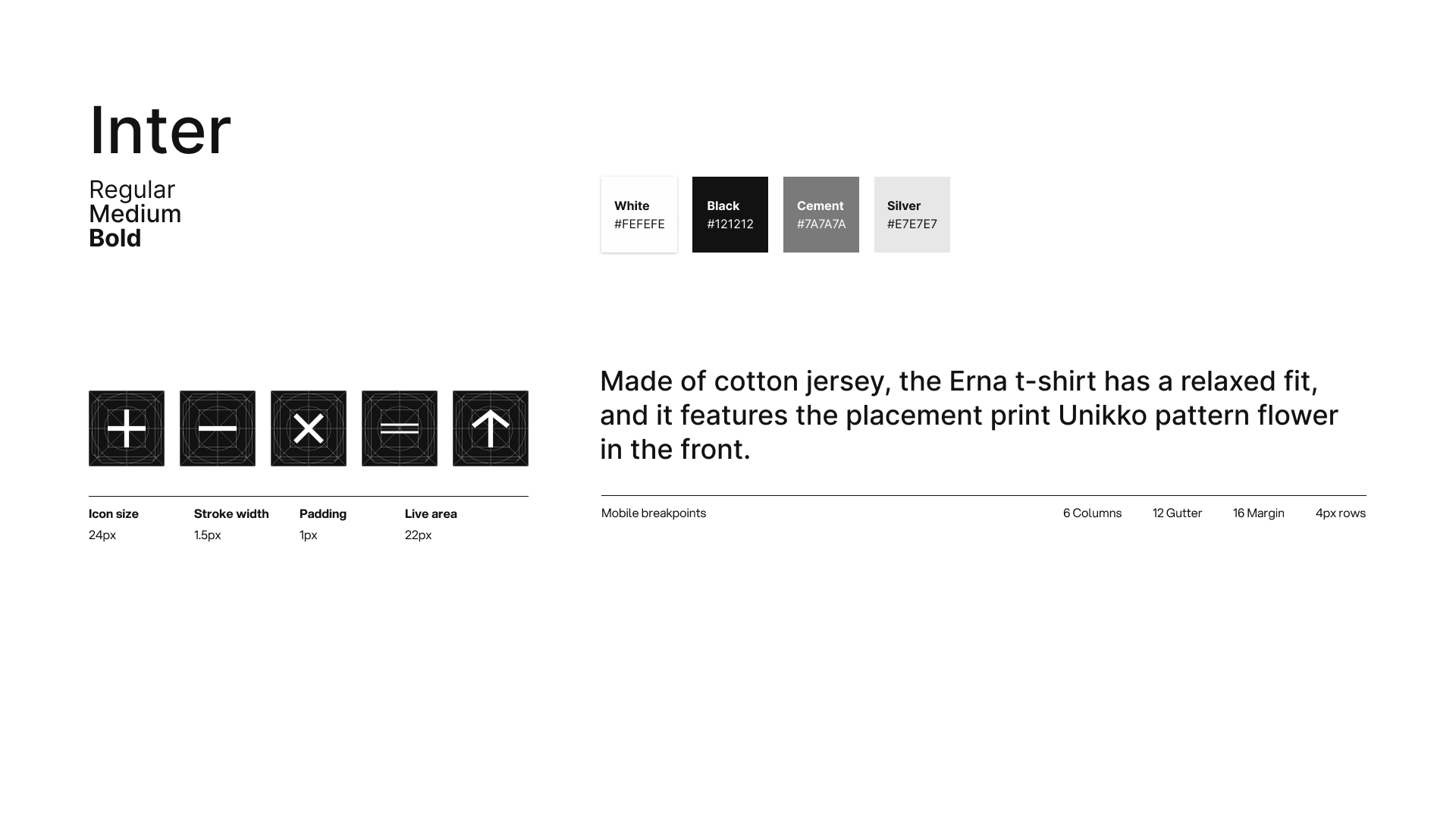
The TrusTex interface follows TrusTrace’s established design system, ensuring consistency across the broader platform while introducing domain-specific components for the processing facility context.
| Component | Usage & Purpose |
| Stepper Navigation | 3-step horizontal stepper guiding users through Sorting → Take Back Facility → Product Info |
| Interactive Mannequin | Front/Back body-mapped SVG for visual flaw annotation with clickable zones |
| Selection Chips | Toggle-based selection (Claim/Collect, product types) for single-tap inputs |
| Info Cards | Contextual helper cards with care label images for finding style/PO numbers |
| Status Badges | Color-coded status indicators (In Progress, Pending, Completed) for process tracking |
| Toast Notifications | Success confirmations for completed labeling steps |
| Data Tables | Sortable, filterable tables with pagination for lot/batch management |
| Modal Dialogs | NFC scanning, error states, and confirmation flows |
Styleguide
User Flows & Interactions
The application was designed around three primary user flows, each optimized for the specific needs of processing facility workers:
Flow 1: New Product Intake
Worker receives a returned garment → Scans or enters style/PO number → System auto-populates from PLM (or prompts manual entry) → Worker selects product type (Claim or Collect) → Identifies flaws using mannequin view → Adds comments → Confirms and proceeds to next step.
Flow 2: Process & Digital Tagging
Worker reviews garment details and process history → Determines wash requirements → Assesses repair needs → Records all information into NFC digital tag → Physically attaches tag to garment → System confirms successful recording.
Flow 3: Packaging & Shipment
Facility manager creates a new lot → Selects processed products to include → Enters packaging date, transportation type, and destination → Marks lot for shipment → System updates delivery tracking → Brand partner receives shipment notification with full traceability.
Outcomes & Impact
DPP was successfully delivered as an MVP and deployed for use with brand partners like Filippa K. The design addressed all identified pain points and established a scalable foundation for future enhancements.
3 Processing Steps | 6 Modules Designed | 20+ Screen Designs | 15+ Components |
Impact Areas
- Eliminated paper-based tracking with a fully digital intake-to-shipment workflow
- Reduced flaw documentation errors through visual body-mapped annotation
- Enabled full product traceability via NFC digital tag integration
- Streamlined lot-based packaging and shipment management
- Provided brand partners with end-to-end visibility into garment processing
- Scalable design system that can extend to additional processing scenarios
Reflections & Learnings
This project reinforced the importance of domain immersion when designing for specialized workflows. Visiting processing facilities and observing workers in their environment provided insights that would have been impossible to gather through remote research alone.
The interactive mannequin for flaw detection was a breakthrough moment in the design process. Early versions used dropdown-only flaw selection, but user testing with facility workers revealed that a visual, body-mapped approach dramatically improved accuracy and speed.
Working within the TrusTrace design system while introducing domain-specific components (like the mannequin flaw detector) required careful balance between consistency and innovation. The result was a module that felt native to the TrusTrace platform while being purpose-built for the unique needs of processing facilities.
DPP
A digital passport system embedded into each garment—accessible via QR code/NFC—that displays:
Origin of raw materials
Supplier and factory information
Certifications (e.g., GOTS, OEKO-TEX)
Recyclability and care info
Product lifecycle data
1. Consumer Experience
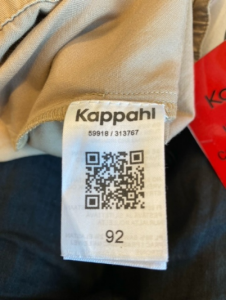
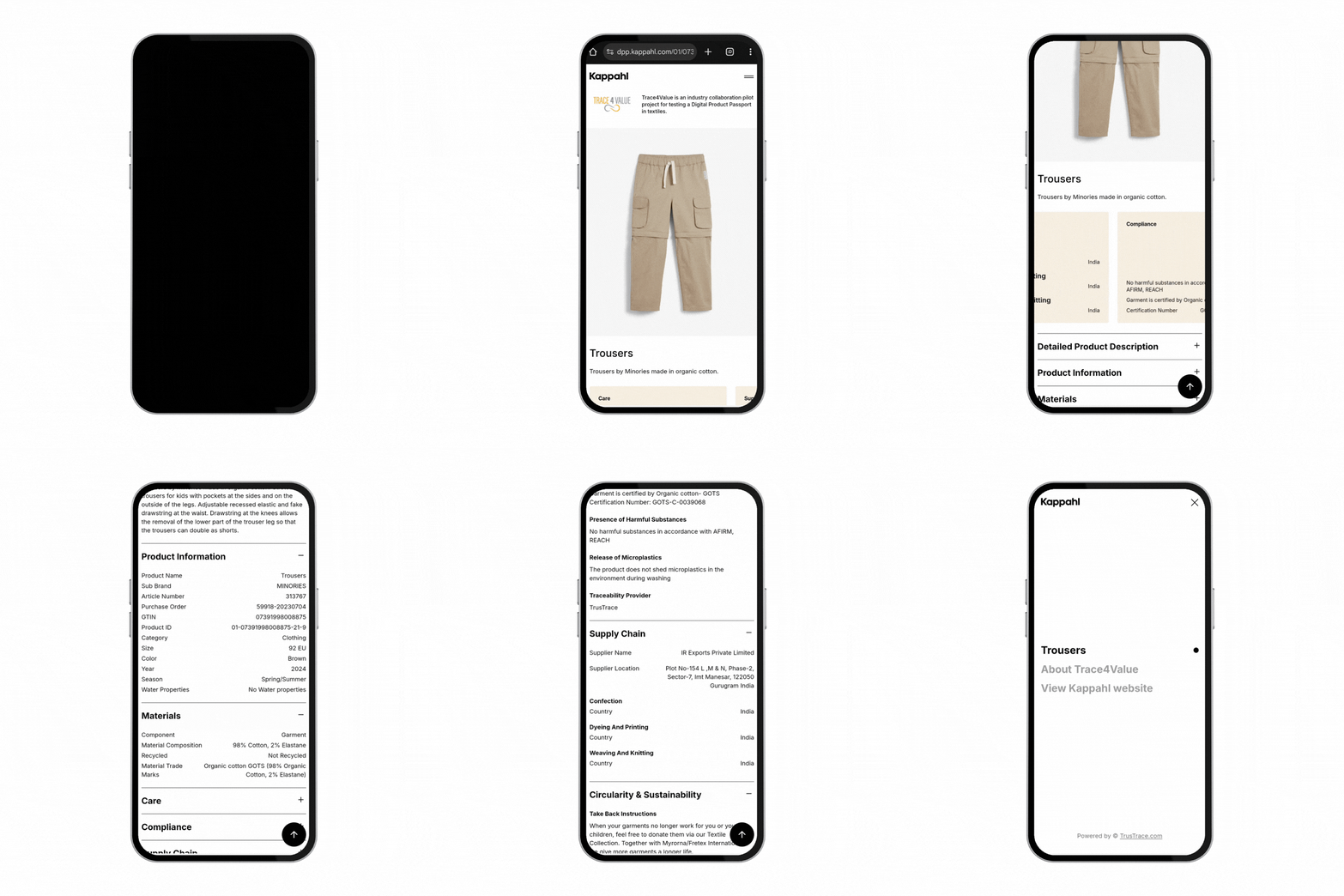
Designed a clean, scannable mobile interface for customers accessing DPP via QR/NFC.
Simplified content layout for easy readability of product origin, materials, and certification.
2. Admin & Brand Experience
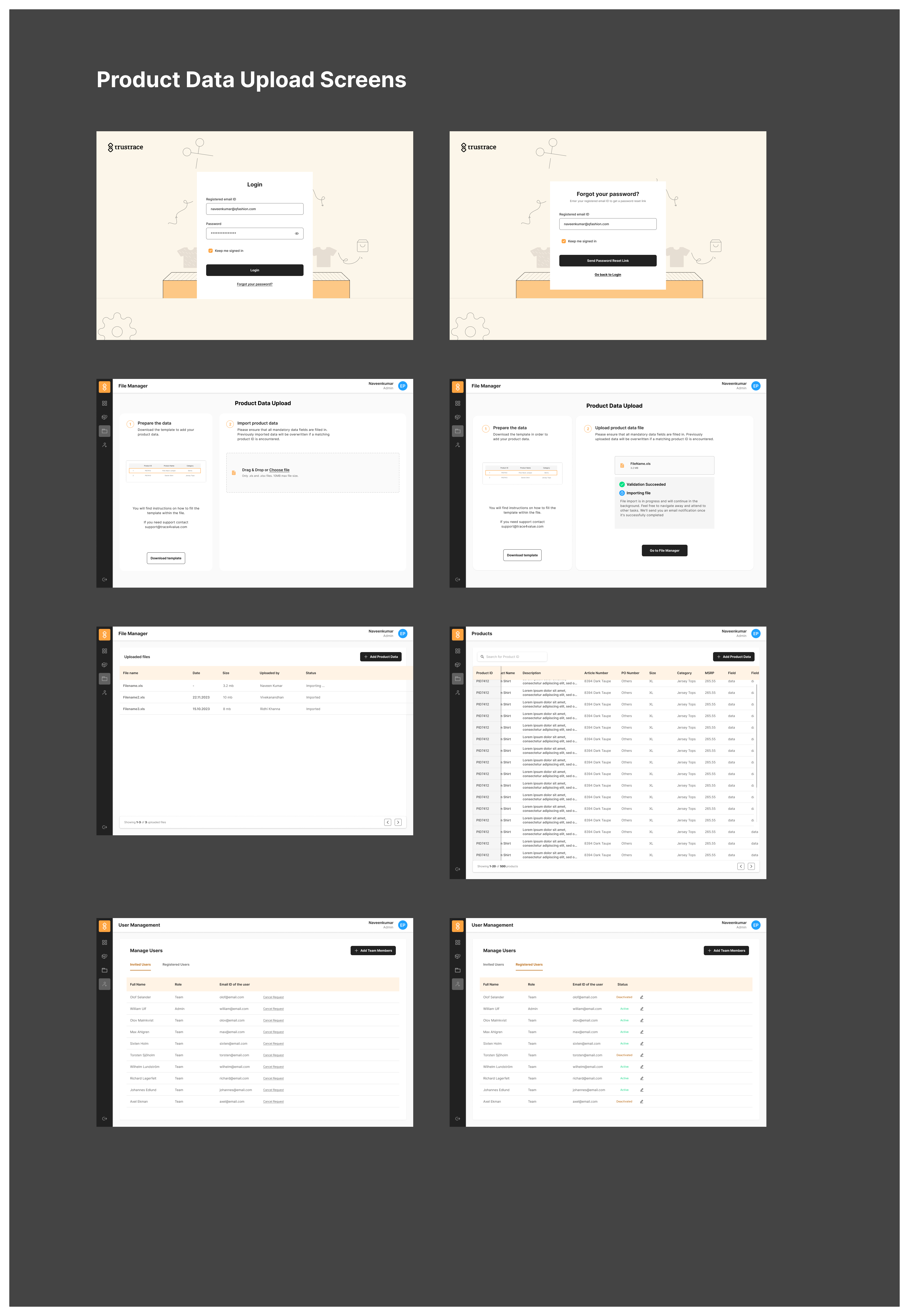
Created screens for user roles, permissions, and onboarding.
Designed a Product Data Upload workflow enabling brands to enter and manage traceability data with structured validations.
📈 Impact
✅ Boosted Consumer Trust: Users gained confidence in brand claims by accessing credible data in seconds.
✅ Simplified Compliance: Brands were able to preemptively align with upcoming EU Digital Product Passport regulations.
✅ Elevated Brand Storytelling: Highlighted ethical sourcing and sustainability practices—helping build goodwill and long-term loyalty.
Why this Project?
Consumers are increasingly environmentally conscious, seeking products that are:
- Sustainable: Responsibly made with minimal environmental impact.
- Transparent: Provide clear information about their origins and supply chains.
- Regulation-Compliant: Adhere to EU guidelines for product traceability and circular economy goals.
However, fragmented supply chains and inconsistent data sharing make it challenging for companies to meet these expectations.
Solution
The Digital Product Passport (DPP) project addresses these challenges by tagging garments with a QR code or NFC tag. This gives consumers instant access to verified details about the product’s lifecycle, materials, and sustainability.
Key Features:
- Transparency: Consumers can scan QR codes to learn about product origins, materials, and sustainability claims.
- Data Integration: Centralized platform consolidates supply chain data with real-time updates.
- Regulatory Compliance: Aligns with EU sustainability requirements, ensuring products meet upcoming regulations.