Self-Service User Access Management
Empowering brands and suppliers with granular, self-service user group management while maintaining platform security and auditability.
TrusTrace
Supply Chain Transparency & Compliance Platform
Designer: Naveenkumar Govindasamy
Role: UX Designer
Project Overview
Category | Details |
Product | TrusTrace — Supply Chain Transparency & Compliance Platform |
Feature | Self-Service User Group Creation & Access Management |
My Role | UX Designer (End-to-end: Research, Ideation, Prototyping, Handoff) |
Timeline | Multi-sprint engagement |
Team | Product Manager, Engineering Lead, Backend Developers, QA |
Tools | Figma, FigJam, Miro |
Executive Summary
TrusTrace is a SaaS platform enabling fashion and retail brands to achieve full supply chain transparency and compliance. Enterprise clients such as Tapestry and Lululemon requested improvements to user group management as part of their internal compliance and IT alignment efforts.
The existing system gave TrusTrace (TT) Admins limited control—they could only create users and associate them with groups, while any detailed permission changes required a support ticket to TT Support. Supplier-side users had even fewer self-service options.
This project redesigned the entire RBAC (Role-Based Access Control) management experience, introducing self-service user group creation, granular module-level permissions, division-based access scoping, and streamlined user lifecycle management—all without compromising platform security or auditability.
Problem Statement
Core Challenge
Brand administrators and supplier users lacked the ability to independently manage user groups, permissions, and organizational divisions—forcing reliance on TrusTrace support for routine access management tasks and creating bottlenecks in day-to-day operations.
Key Pain Points
- TT Admins could only create user groups and associate users, but could not configure granular permissions without contacting TT Support.
- Supplier-side users had no ability to create read-only user groups independently.
- No differentiation between admin and non-admin capabilities within user groups.
- No module-level access control—some suppliers only use particular modules, yet all users had the same access.
- User onboarding relied on manual Excel sheet uploads, creating friction and errors.
- No division-based scoping to organize users by geography or business unit.
Business Context
Brands like Tapestry operate through complex organizational hierarchies—a parent company (e.g., Tapestry) with multiple child companies (e.g., Kate Spade, Coach), each with their own Brand Admins. The existing flat permission model could not accommodate this structure, leading to compliance risks and operational inefficiencies.
Design Process
This project followed a Double Diamond design process, structured into four distinct phases to ensure thorough exploration before converging on solutions.
Phase 1: Problem Discovery
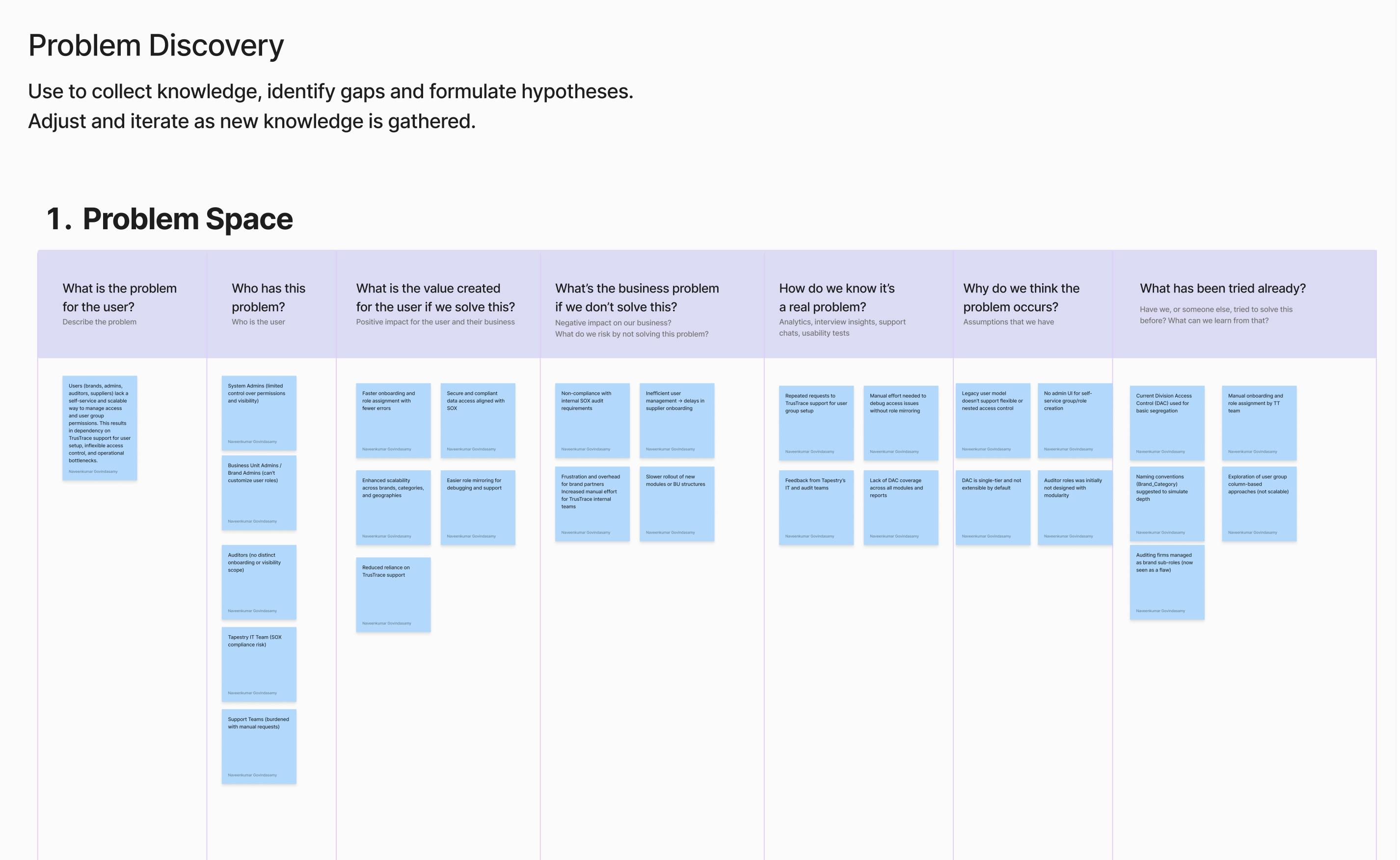
The discovery phase focused on understanding the existing system architecture, stakeholder needs, and the organizational hierarchy (DAC structure) that governs how System Admins, Brand Admins, and Suppliers interact with user management.
Research Activities
- Mapped the DAC (Distributed Access Control) hierarchy: System Admin → Parent Brand → Child Companies → Brand Admins → Suppliers.
- Conducted stakeholder interviews to surface permission-related pain points and compliance requirements.
- Audited the existing admin panel to document current capabilities and limitations across Users, User Groups, and Divisions tabs.
- Analyzed support ticket patterns to identify recurring access management requests.
Key Findings
- User creation was being done via Excel sheet uploads with only Username, Email ID, and Status fields—lacking group and permission context.
- The DAC structure needed clarity around primary user changes when invites went unaccepted.
- Brands needed distinct user group behaviors: read-only groups for suppliers, configurable admin/non-admin groups for internal teams.
- Module subscription dependencies (what modules a brand subscribes to) directly impact which permissions can be assigned to user groups.
Phase 2: Problem Alignment
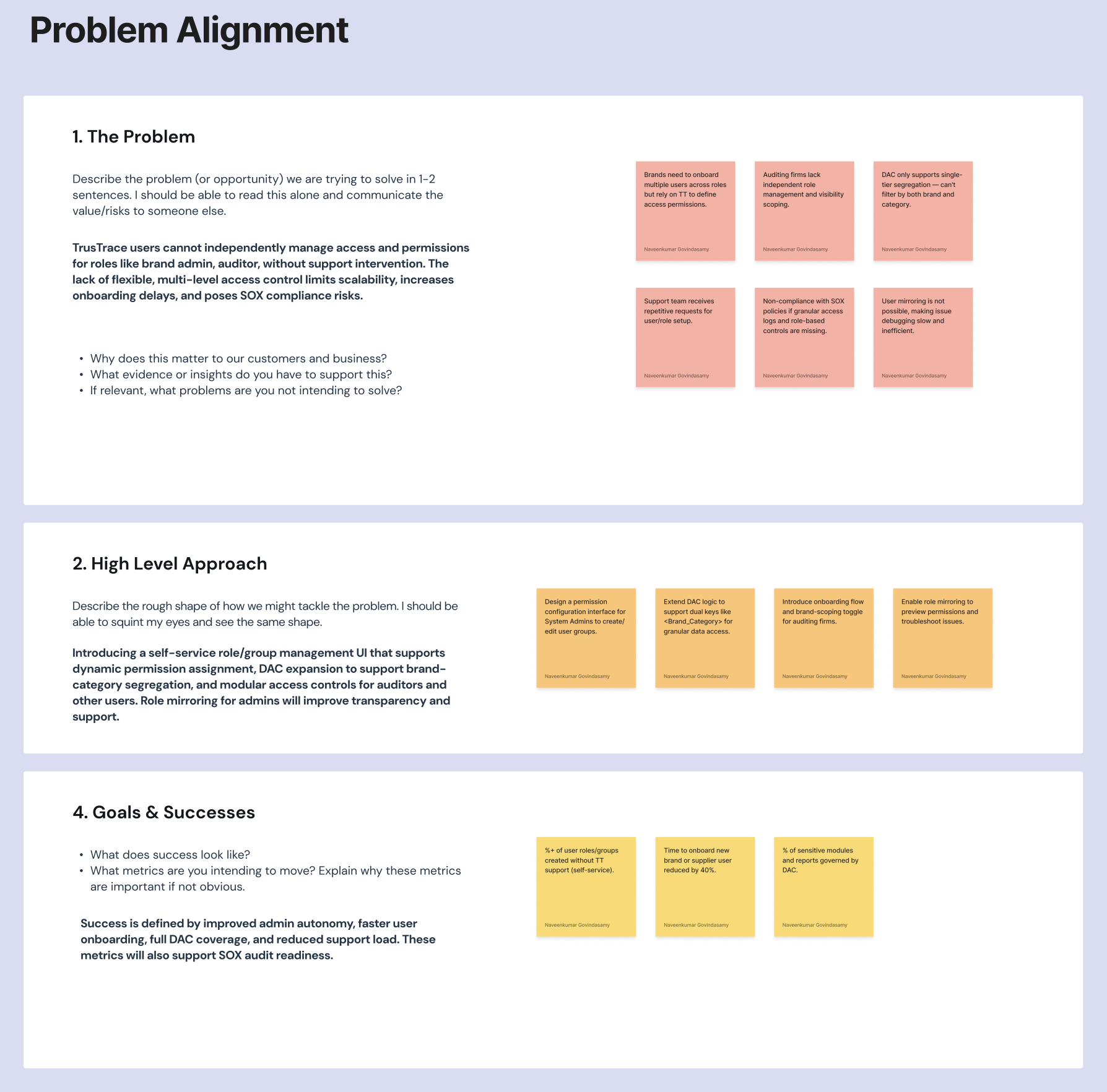
Findings from discovery were synthesized and presented in an internal workshop to align stakeholders on the problem scope. The workshop used the background context, user flow mapping, and requirement prioritization to agree on what would be tackled in this release versus future iterations.
Alignment Outcomes
- Confirmed scope: Self-service user group creation, module permissions, user lifecycle management, and division management.
- Defined user statuses: Active (invite accepted), Inactive (deactivated), and Pending (invite unaccepted).
- Agreed on a subscription and module dependency model—TT Tech Team manages subscriptions; brands configure permissions within their subscribed modules.
- Deferred: Division management editing was descoped for the initial release.
Phase 3: Solution Discovery
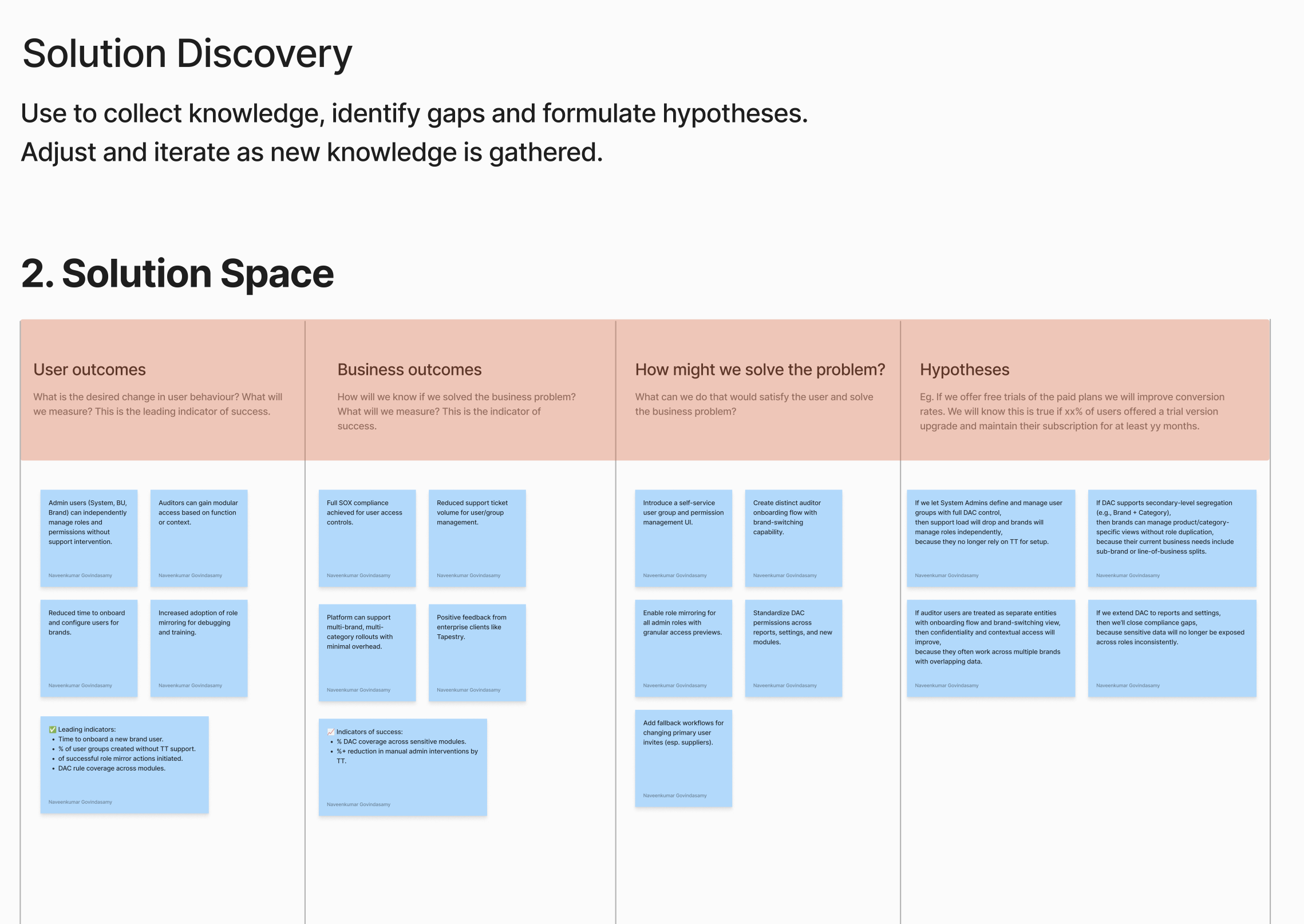
With the problem well-defined, the team moved into ideation and rapid prototyping. The RBAC Management interface was designed as a tabbed experience with four core areas: User Groups, Module Permissions, User Assignments, and Divisions.
Exploration & Prototyping
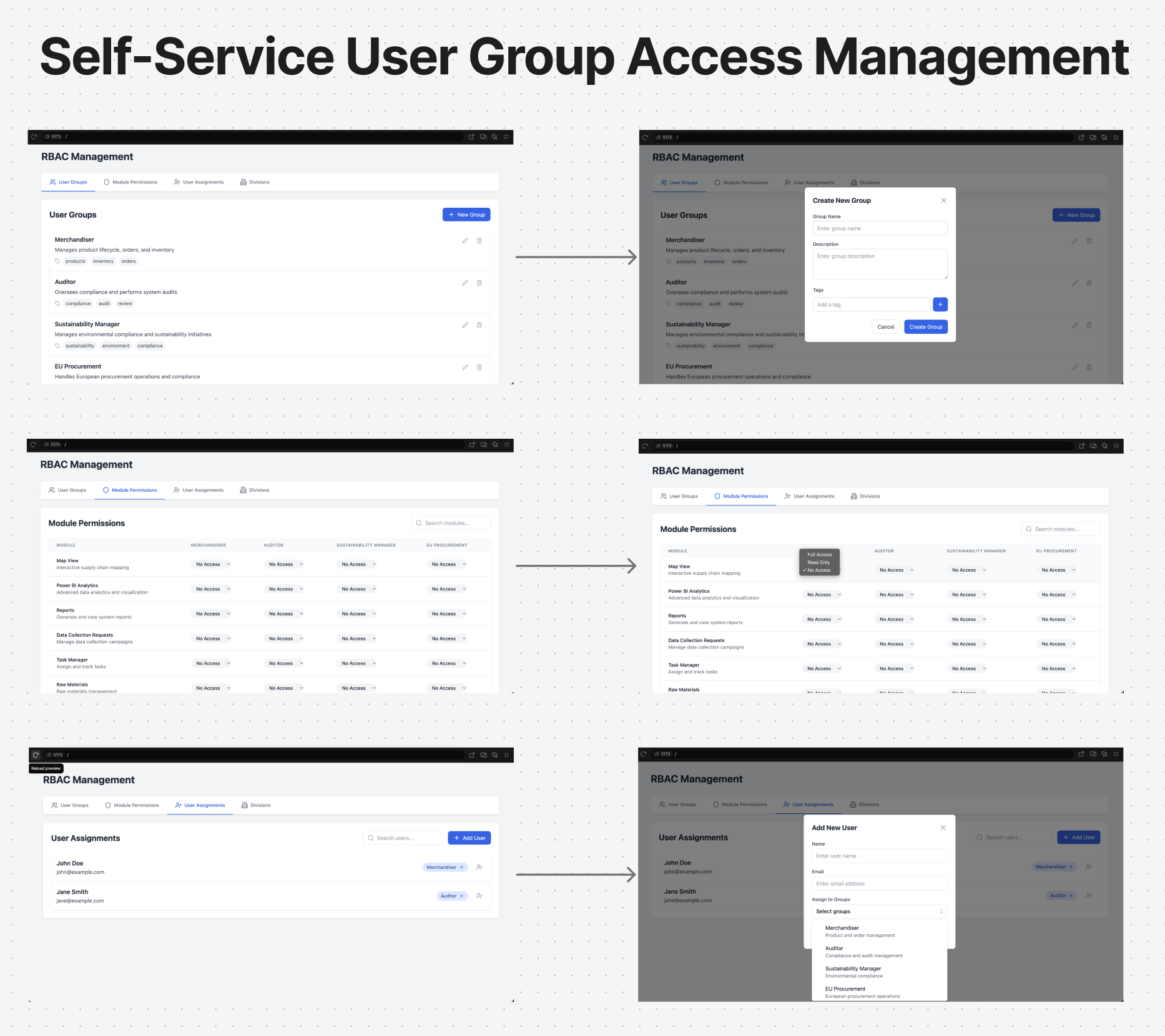
1st Iteration: Quick lo-fi prototypes were created for discussion, exploring the RBAC Management screens with tab-based navigation for User Groups, Module Permissions, User Assignments, and Divisions.
2nd Iteration: Feedback from the first round led to a refined approach. The Divisions tab was further developed, the Add User to Division flow was explored with location-based scoping, and the module permission matrix was simplified.
Design Decisions
- Adopted a 3-step wizard for User Group creation: Step 1 (Group Name & Description) → Step 2 (Module Permissions with Full/Read/No Access) → Step 3 (User Assignment).
- Module permissions use a radio-button matrix (Full Access, Read Access, No Access) for each module—simple and scannable.
- Division creation supports batch entry with an “Add More” option to reduce repetitive workflows.
- User export includes comprehensive fields: First Name, Last Name, Email, TT User ID, External User ID, Status, User Group, Divisions, Email Notifications, Created/Modified metadata.
Phase 4: Solution Alignment
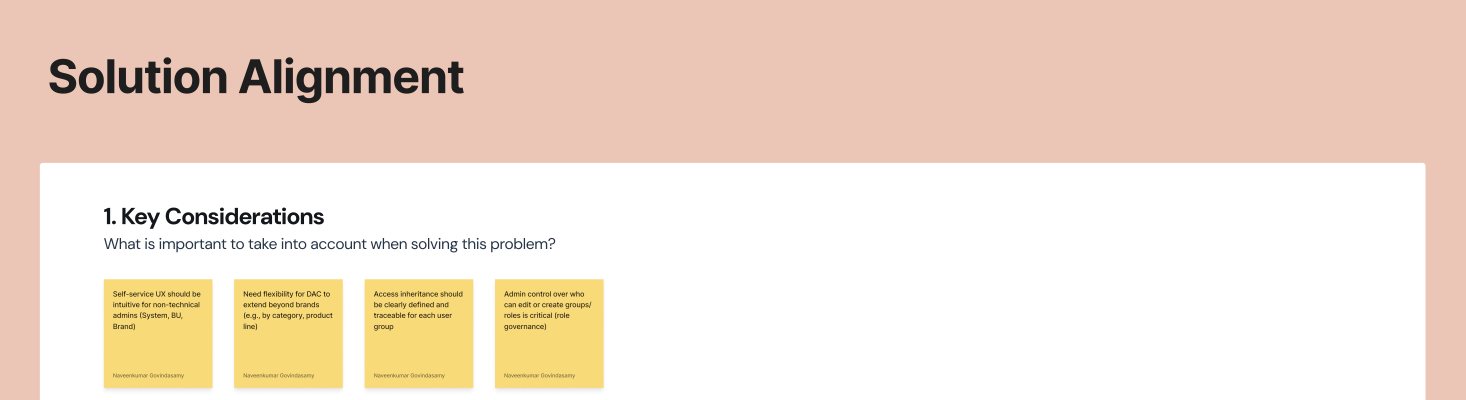
The refined designs were presented in a second internal workshop for final alignment. The presentation covered the complete background, the user flow, and detailed interaction specifications for each feature area.
Stakeholders validated the approach, and the final designs were prepared for engineering handoff with detailed user journey maps, state definitions, error handling, and edge case documentation.
Solution: RBAC Management System
The final design delivers a comprehensive, self-service RBAC management system organized into three primary areas accessible from the User Management admin panel.
1. User Management
The Users tab provides a centralized view of all brand users with full lifecycle management capabilities.
Create User
A streamlined form for onboarding new users with the following fields: First Name, Last Name, Email ID, External User ID, User Group (multi-select), Division (conditionally shown if enabled by TT Admin), and Email Notification toggle. The system validates for duplicate email addresses and provides success/error feedback.
Manage & Edit User
Existing users can be edited with updated group assignments and division associations. The manage view includes actions for Deactivating users (with a warning modal), Activating inactive users, and Resending email invites (with rate limiting—wait 10 minutes between resends).
Export Users
Brand admins can export the full user list as an Excel file with comprehensive metadata including names, emails, TT User ID, external IDs, status, groups, divisions, notification preferences, and audit trail data.
2. User Group Management
The User Groups tab enables self-service creation and management of permission-based user groups.
Create User Group (3-Step Wizard)
Step 1 — Group Details: Enter the Group Name (required) and an optional Group Description.
Step 2 — Module Permissions: Configure access levels for each module the brand subscribes to. Each module offers three permission tiers: Full Access, Read Access, or No Access via a clear radio-button matrix.
Step 3 — User Assignment: Select users to assign to this group using a checkbox list. Users can belong to multiple groups simultaneously.
Manage User Group
Existing groups can be edited through the same 3-step flow with an Update action. Groups can be deleted with a warning modal; deletion is blocked if users are still associated with the group, surfacing a block modal to prevent orphaned user access.
Export User Groups
Export group data including Group Name, Description, associated Users, Created Date, Created By, Last Modified Date, and Last Modified By.
3. Division Management
The Divisions tab introduces organizational scoping, allowing brands to segment users by geography, business unit, or any custom division structure.
Create Divisions
A batch-friendly creation form with Division Name fields and an “Add More” option for creating multiple divisions at once. This reduces the friction of repetitive single-entry workflows.
DAC (Division Access Control) Creation
Divisions can be created with associated styles, raw materials, suppliers, and facilities. The export includes Division Name, Description, Associated Users, Styles, Raw Materials, Suppliers, Facilities, and full audit metadata.
Subscription & Module Dependency Model
A critical architectural element of the solution is the three-tier subscription and module dependency system that governs what permissions are available:
Tier 1 — TT Tech Team: Manages the master subscription configuration, determining which modules are available on the platform.
Tier 2 — Brand Subscription: Each brand subscribes to specific modules (e.g., Visualization, Task Manager, Product, Supplier). The brand can only configure permissions for modules they subscribe to.
Tier 3 — User Group & Module Access: Brand Admins assign module-level permissions (Full, Read, None) to user groups, scoped within their subscription.
This layered model ensures that permissions cascade correctly and that no user group can be granted access beyond what the brand has subscribed to.
User Journey
The complete user journey was mapped to document every interaction path, including success states, error handling, and edge cases.
Primary Flow: Brand Admin
- Login → Profile Icon → User Management
- Navigate between tabs: Users, User Groups, Divisions (Divisions visible only if enabled by TT Admin)
- Create User: Fill form → Assign to User Group (multi-select) → Assign to Division → Toggle Email Notification → Create
- Create User Group: 3-step wizard → Name → Module Permissions → User Assignment → Create
- Manage users: Edit details, deactivate/activate, resend invites
- Export data: Download user lists, group configurations, or division data as Excel files
Status Model
Active: User has accepted the invitation and has activated access.
Inactive: User has been deactivated by an admin.
Pending: Invitation has been sent but not yet accepted by the user.
Error & Edge Case Handling
- Duplicate email detection during user creation with clear error messaging.
- Rate-limited invite resending with a 10-minute cooldown message.
- Block modal when attempting to delete a user group that still has associated users.
- Warning modal for destructive actions (deactivation, group deletion) requiring explicit confirmation.
- Division tab conditional visibility based on TT Admin configuration.
Design Iterations
Quick Prototype (For Discussion)
Iteration 1: Rapid Prototyping
The first iteration produced lo-fi prototypes for the core RBAC Management screens. These were designed specifically for discussion with the product team and engineering leads. The focus was on information architecture—establishing the tab structure (User Groups, Module Permissions, User Assignments, Divisions) and the basic interaction patterns for creating and managing entities.
Key feedback from this iteration included requests for clearer permission matrices, a simplified division management flow, and better handling of the user-to-division assignment with location-based scoping.
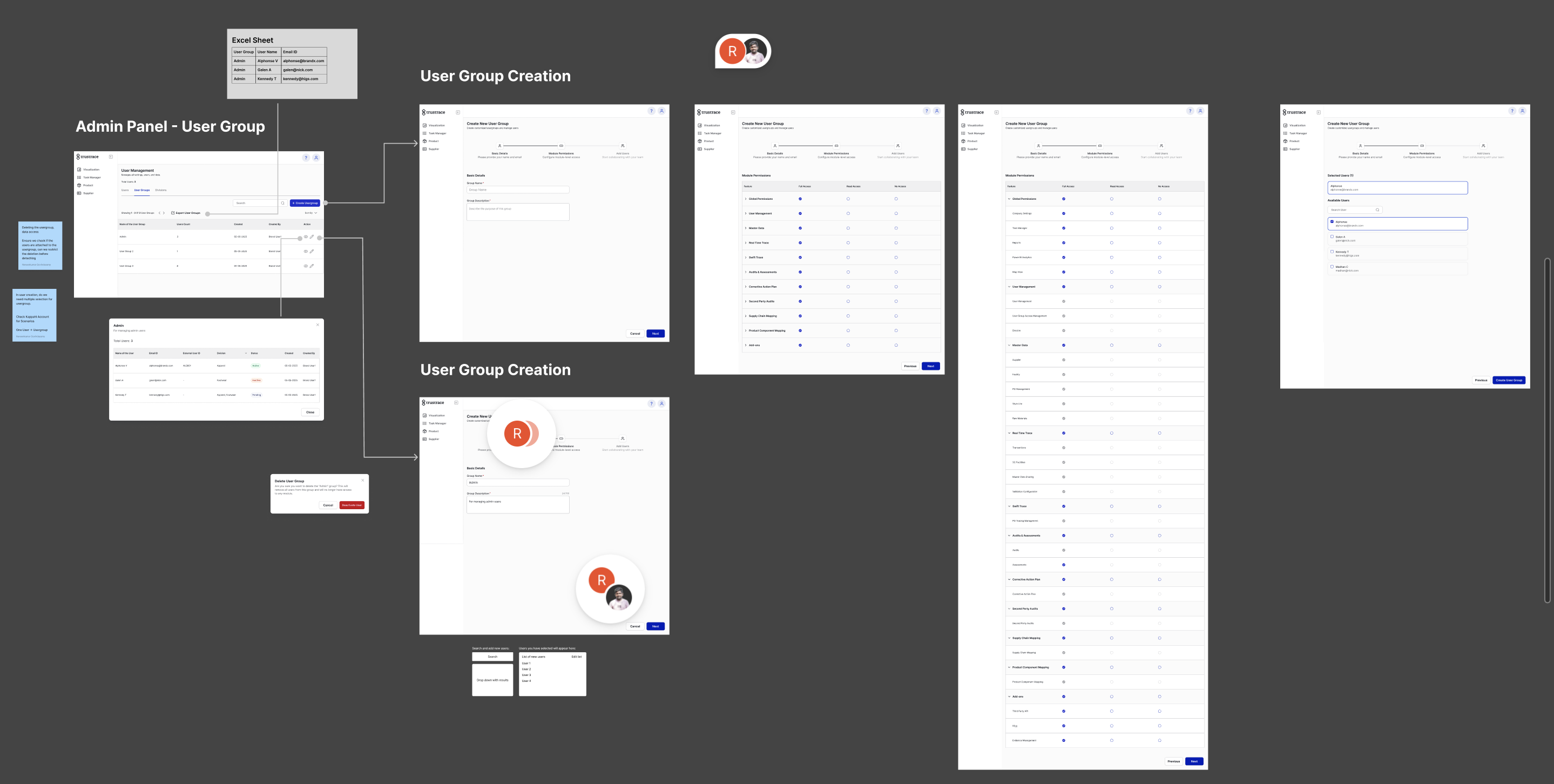
Iteration 2: Refined Design
The second iteration incorporated feedback into a more polished design presented at an internal workshop. Key changes included:
- Consolidated the RBAC tabs into a cleaner 3-step wizard pattern for group creation.
- Introduced the radio-button permission matrix for Full/Read/No Access at the module level.
- Added comprehensive user journey documentation with success/error states.
- Designed the export functionality with detailed field specifications.
- Created the subscription dependency model visualization to clarify the permission hierarchy.
Final Design
The final screens were delivered as high-fidelity mockups in Figma with complete specifications for:
- User tab: Admin panel with data table, create/edit user forms, status management, and export.
- User Group tab: List view, 3-step creation wizard, manage/delete flows with safety modals.
- Divisions tab: Create (batch), manage, DAC creation with associated entities, and export.
- Module access reference: Full taxonomy of platform modules organized by category (Organization & User Management, Company Configuration, Supplier & Facility Management, Products & Purchase Order Management, Supply Chain & Product Mapping, Audit & Compliance, Data Collection, Analytics & Reporting).
Impact & Outcomes
Expected Outcomes
- Reduced dependency on TT Support for routine access management tasks, freeing support bandwidth for complex issues.
- Empowered brand admins with self-service capabilities for user group creation, permission management, and user lifecycle control.
- Improved compliance posture through granular, auditable permission controls aligned with enterprise organizational hierarchies.
- Streamlined user onboarding by replacing Excel-based bulk uploads with an intuitive in-platform creation flow.
- Met enterprise client requirements (Tapestry, Lululemon) for internal compliance and IT alignment.
Key Learnings
1. Enterprise hierarchies demand flexible permission models. The DAC structure (parent-child companies with delegated admin roles) required designing a permission system that could accommodate multi-layered organizational structures without becoming overly complex for end users.
2. Subscription-aware design prevents configuration errors. By tying available permissions to the brand’s module subscriptions, the design proactively prevents admins from creating user groups with permissions they don’t have access to—reducing support tickets and confusion.
3. Progressive disclosure through wizards reduces cognitive load. The 3-step wizard pattern for user group creation breaks a complex configuration task (name, permissions, users) into manageable steps, with clear progress indicators.
4. Safety patterns build trust in self-service tools. Warning modals for destructive actions and block modals for constraint violations give admins confidence to manage permissions independently, knowing the system will prevent harmful mistakes.
5. Export capabilities are essential for enterprise adoption. Enterprise clients require the ability to export user and permission data for auditing, compliance reporting, and integration with their own IT governance tools.